
Kriya App Download For Android And iOS In BD
Updated

The Kriya app gives users in Bangladesh access to casino games, sports betting, payments, and account tools from a phone. Google Play does not list the app, so Android users download the APK from the official website. On iPhone and iPad, a Safari shortcut provides the same mobile access without a separate iOS download.
Kriya App Overview
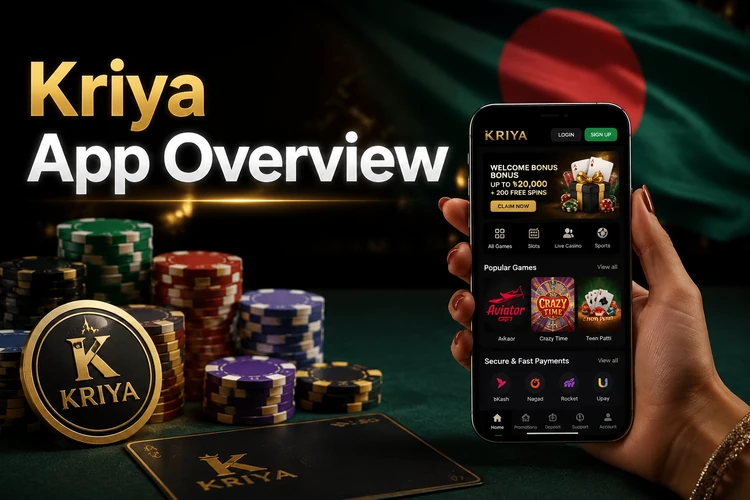
The mobile client follows the desktop layout but adapts menus and controls for touch screens. Users can access live betting, slots, payment tools, and support without changing devices.
The application supports Bengali and English, while local payment methods fit the deposit process used by many Bangladesh players.
| Parameter | Details |
|---|---|
| Version | 3.2.1 |
| APK size | 18 MB |
| Operating system | Android 5.0 or newer; iOS 12 or newer through Safari |
| Languages | English, বাংলা, Hindi |
| Currency | BDT, USD, INR |
| Price | Free |
| Installation method | APK download for Android; Safari home-screen shortcut for iPhone and iPad |
| Last update | January 2026 |
The application is free to download and use. The same account connects the Kriya app with the website, so the balance and bet history remain available across devices.
Download The Kriya APK For Android
The Kriya APK is downloaded from bd-kriya.net rather than an app store. Using the official website helps you avoid old packages and files modified by third-party distributors.
The package is designed for mobile connections common in Bangladesh. A stable Wi-Fi or data connection makes the download and first login smoother.
Android Requirements
The application needs a small set of resources and can run on older smartphones. This helps users who do not own a current flagship device.
- Android 5.0 or newer
- At least 1 GB of RAM
- At least 50 MB of free storage
- Wi-Fi or mobile data connection
Older devices often meet these requirements. Keep extra storage available because games and cached images may need additional space after installation.
How To Install Kriya APK
Installation takes a few minutes after the file finishes downloading. Android may request permission before it accepts an APK from a browser.
- Open bd-kriya.net in the Android browser and download the Kriya APK.
- Open Settings and allow your browser to install apps from unknown sources.
- Find the downloaded file in the notification panel or file manager.
- Tap the file, select Install, and wait for the process to finish.
- Open the application and complete the Kriya app login or register an account.
After installation, you can disable the unknown-sources permission. The application will continue working, while future versions require another manual download.
Kirik Kriya On iPhone And iPad

A separate iOS application is not available. iPhone and iPad users can add the Kriya online website to the home screen through Safari.
The shortcut opens in a focused browser view and keeps the site easy to reach. It uses the same account and website functions as Android access.
- Open bd-kriya.net in Safari.
- Tap the Share button at the bottom of the screen.
- Select Add to Home Screen and confirm the shortcut.
The new icon opens the mobile site like a regular application. Safari remains the underlying technology, so performance depends on the iPhone and network connection.
Updating The Kriya App
The application can notify you when a new version becomes available. Android does not normally update sideloaded APK files automatically, so the replacement process is manual.
- Remove the old application from the phone.
- Download the latest APK from bd-kriya.net.
- Install the new package using the Android installation steps.
Your balance, transaction records, and open bets are stored with the account. They remain available after you log in to the updated application.
Kriya App Vs Mobile Site
The application and mobile website use one account and connect to the same Kriya casino services. The better choice depends on how you use your phone.
Both options open the same games, betting markets, and payment tools. The main differences concern installation, storage, and notifications.
- Speed: the application can cache some resources for repeat visits.
- Notifications: the installed APK can provide alerts for settlements and Kriya bonus offers.
- Storage: the mobile site needs no installation space, while the APK needs at least 50 MB.
- Installation: a website shortcut takes seconds, while the APK needs a permission change.
The mobile site suits users who do not want to install an APK. It still provides the Kriya casino game library and live betting interface.
What You Can Do In The Kirik Kriya App
The app provides the main functions available on the website. Its touch layout supports account management, payments, sports, casino games, and support.
- Register an account or recover a forgotten password.
- Deposit and withdraw funds through bKash, Nagad, Rocket, or cards.
- Place pre-match and live bets on cricket, football, and kabaddi.
- Play slots, live dealer tables, and other Kriya casino games.
- Contact customer support through the built-in chat.
The interface is available in বাংলা after you change the language in settings. This includes menu labels, game categories, and key account screens.
App Bonuses And Notifications
Push notifications can show account updates, promotions, and sports information. They help users follow activity without opening the application repeatedly.
- New promotions, including selected Kriya bonus offers
- Bet settlement results after a market closes
- Match-start notices for selected cricket and football events
You can disable notifications in the phone or application settings. Turning them off does not remove access to promotions or account functions.
Fixing Kriya App Problems
Common problems usually relate to permissions, the connection, or an outdated APK. Checking the following points can resolve simple issues quickly.
Start with the basic checks before contacting support. Confirm that the phone has free space and that the current APK matches the Android version.
- APK does not install: enable installation from unknown sources and check available storage.
- Application closes: clear the cache, restart the phone, and open the app again.
- OTP does not arrive: check the phone number and confirm that the device receives SMS messages.
- Games do not load: change between mobile data and Wi-Fi, then reopen the game.
If the problem continues, contact support through chat and include the phone model, Android version, and a short description of the error.
FAQ
Download the APK only from bd-kriya.net and check that the file comes from the official website. Avoid third-party APK pages, which may distribute old or modified files. Keep Android security settings active after installation.
The Kriya APK is distributed through the website because Google Play limits real-money gambling applications in many regions. Android users can download the package directly from bd-kriya.net.
Yes. The same login works on the Kriya app, desktop website, and mobile browser. Your balance, account details, and bet history connect to the same account.
The APK download is about 18 MB. Normal browsing and betting use less data than video streaming, while live video and game media can increase consumption.
Yes. Promotions available for your account can appear in the app. Check the offer conditions for deposit, wagering, expiry, and withdrawal requirements before claiming a Kriya bonus.